What you'll end up with
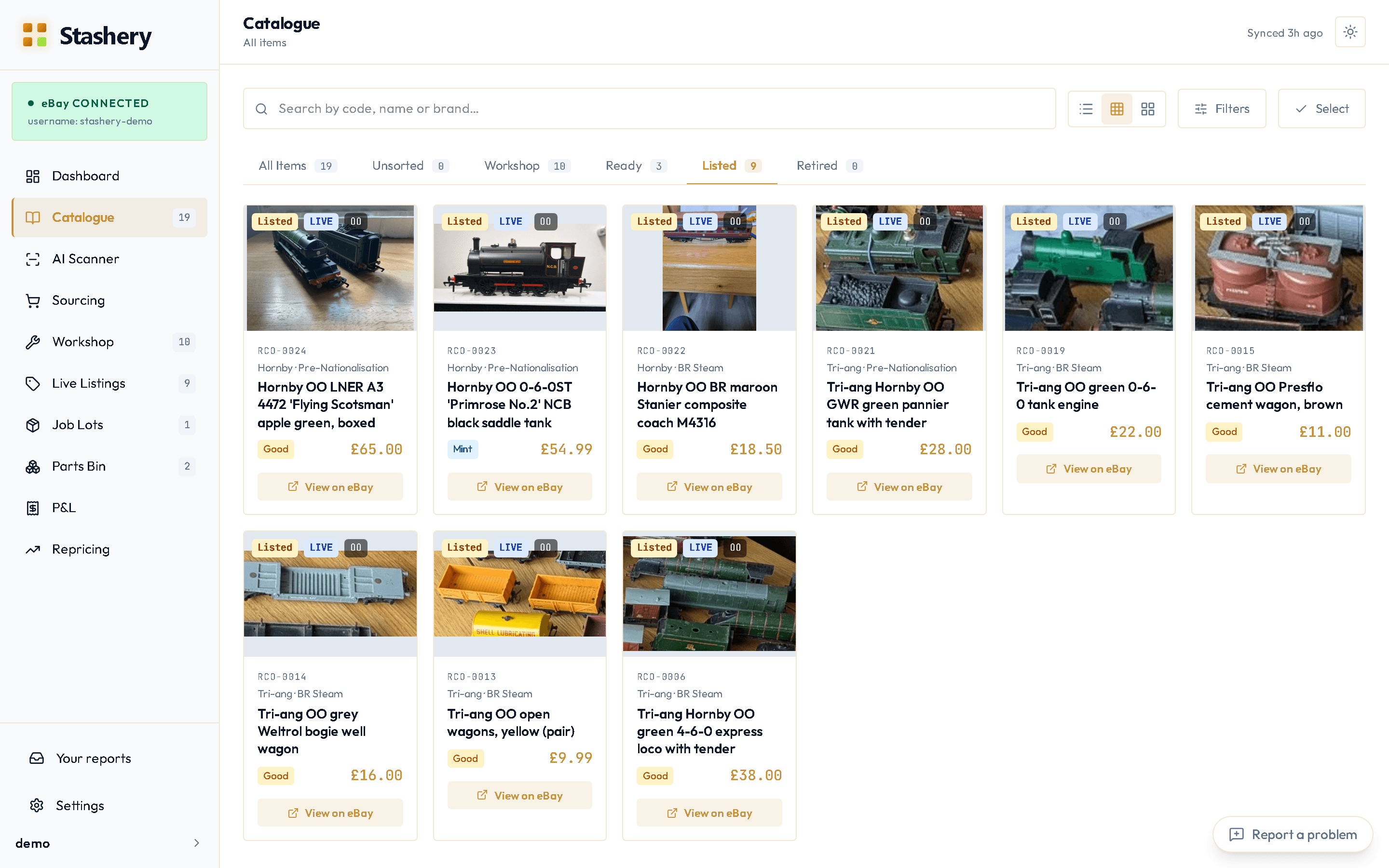
Every listing that's live on eBay right now appears in your Catalogue as an item, with its title, photos, price and eBay link. Each one also appears in Live Listings, so you can see prices, watchers and time left in one table.
Imported items don't know what you paid — eBay doesn't have that — so the next job after importing is adding purchase prices (see Read your P&L). Until you do, Stashery says "purchase price unknown" rather than pretending it was £0.
Steps
- Connect your eBay account first (here's how).
- Open Catalogue. If it's empty you'll see Import my eBay listings in the middle of the page; otherwise open Settings from the menu under your name, then Data, and find it in the Import from eBay card, beside Import sales history.
- Press it. Stashery asks eBay for your active listings and creates an item for each one. A hundred listings takes about a minute.
- When it finishes you'll see a summary: how many were created, how many were already there, and any that couldn't be imported (with the reason).
- Open a few items and check the details. Stashery reads the manufacturer from the title where it can — "Hornby R2785 Class 31" becomes manufacturer Hornby — but you can correct anything.
What you'll see
The Catalogue fills with cards, one per listing, each marked Listed with a View on eBay link. The sidebar counts update. Live Listings shows the same items as a table with price, watchers, views and time remaining.
Or import from a spreadsheet
If you keep a list in Excel or Google Sheets, press Import spreadsheet in the Catalogue and choose a CSV file or an Excel workbook (.xlsx); Stashery reads the first sheet, with the column headings in the top row. You match each column to what it holds — name or description, maker, catalogue number, price paid, condition, gauge, era, DCC and sound fitted, or notes — and see exactly what will be added before anything is saved. Stock you plan to sell lands in the Workshop's In Test column, just like a scan; or mark the rows as part of your collection, not for sale.
If something goes wrong
- "Connect your eBay account first".
- Settings › eBay doesn't say Connected yet — go back to Connect your eBay account.
- Some listings show as failed in the summary.
- The reason is next to each one. The usual causes are a listing that ended between you pressing the button and the import reaching it, or an auction-format listing (Stashery works with fixed-price listings).
- An item has no manufacturer or catalogue number.
- eBay titles don't always contain them. Open the item and either type them in or press Re-identify to let Stashery propose candidates from the title — you choose which to apply, it never guesses silently.
- You see items you sold months ago.
- Import only pulls active listings. Sold history comes from Import sales history, in Settings › Data beside Import my eBay listings — eBay only goes back about 90 days, so do it soon after joining.